


Blueprint Mover
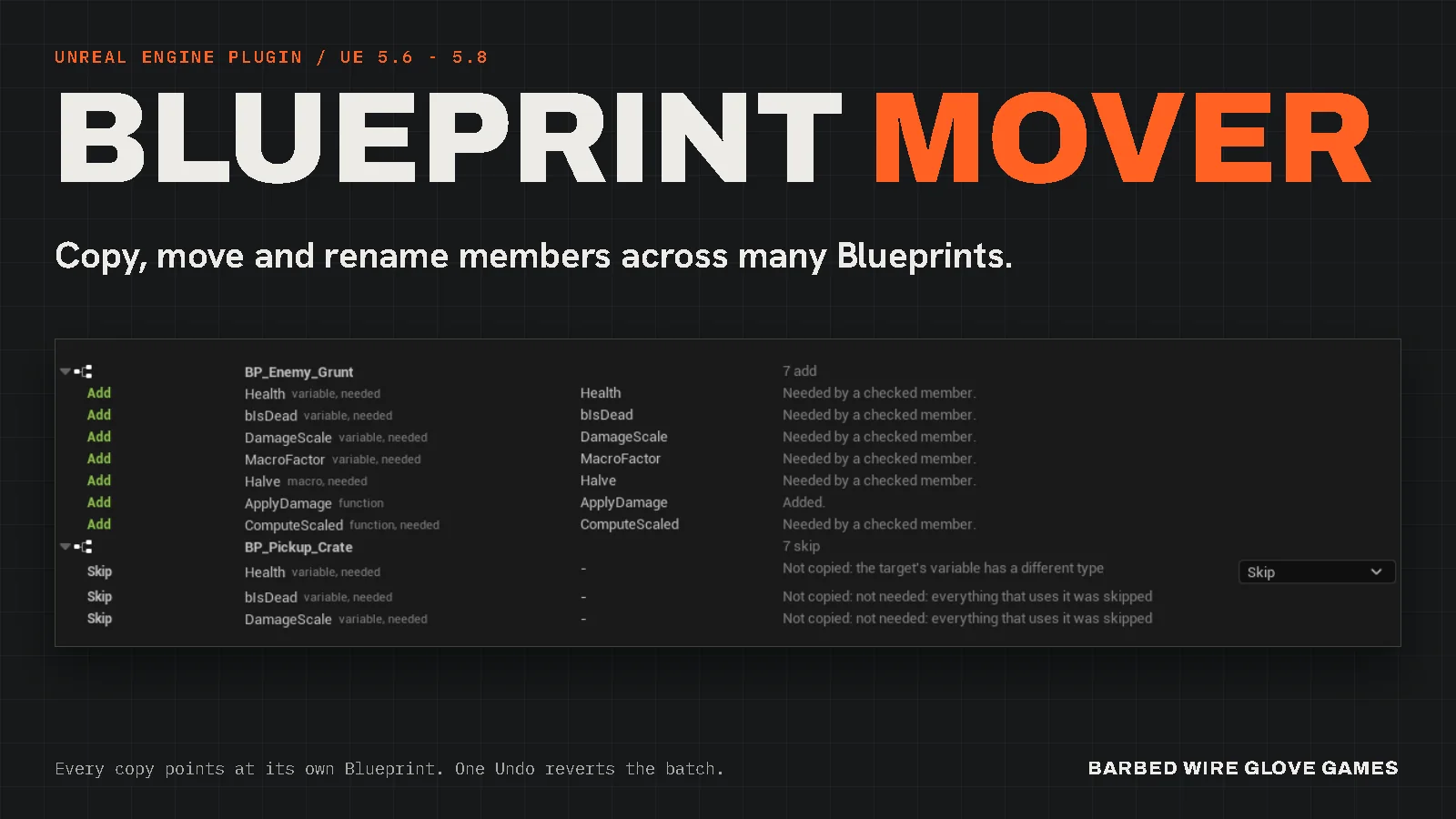
Copy variables, functions, macros, components and events from one Blueprint into many. Every copy points at its own Blueprint, and one Undo reverts the whole batch.
Blueprint Mover is an editor plugin for Unreal Engine 5.6 to 5.8 on Windows. One panel has three modes: Copy, Move to Parent, and Rename / Change Type. Each mode lists every change before it makes one, and nothing changes until you apply.
Get it on Fab Read the documentation
Personal $59.99, Professional $119.99. Support: support@barbedwireglovegames.games
Not related to Epic's Mover plugin for character movement.
Quick start
You need one Blueprint to copy from and at least one to copy into. The source never changes.
- Install. Put the plugin in your project's
Pluginsfolder (or install it from Fab) and check Blueprint Mover in Edit > Plugins. Restart the editor when it asks. - Open. Click Tools > Blueprint Mover, or the Blueprint Mover button on the level editor toolbar. The panel opens as a tab you can dock anywhere.
- Copy. Pick the source in 1. Copy from and check members in 2. Members to copy. Drag the target Blueprints from the Content Browser into 3. Copy into. Read 4. Preview, then click Apply.
Apply compiles every Blueprint it changes and saves nothing. Save when the result looks right, or click Edit > Undo to go back. The guide covers Move to Parent and Rename / Change Type step by step.
Requirements
- ENGINE
- Unreal Engine 5.6, 5.7 or 5.8. UE 5.5 and older are not supported.
- PLATFORM
- Windows (Win64), in the editor. Nothing from the plugin goes into your packaged game.
- PACKAGE
- Code plugin with C++ source. Building it from source needs Visual Studio with the Game development with C++ workload.
- DEPENDENCIES
- Unreal Engine modules only. No third-party libraries.
Every copied node uses the target's own members
Each mode previews first and applies as one undo step.
A macro node pasted into another Blueprint loses its macro and is left broken. A graph duplicated into another Blueprint keeps pointing at the source's macro, and saving it fails with "Illegal reference to private object".
Blueprint Mover copies the members, re-points every node to the target's own members, and brings along what they use. In the tests, the copies compile with 0 errors, save clean, reload without the source, and return the same results as the source for the same inputs.
Move to Parent moves many members at once, macros, components and events included, to a parent or a grandparent. Rename / Change Type lists every node that uses a member, in every Blueprint that uses it, before it changes anything.
- PASTED MACRO NODE
- Loses its macro and is left broken.
- DUPLICATED GRAPH
- Keeps pointing at the source's macro, so saving fails.
- BLUEPRINT MOVER
- Every copied node points at the target. In the tests, the copies compile, save and reload without the source.
- Copy into many Blueprints
- Variables, functions, macros, components, custom events and event dispatchers, from one Blueprint into every target you add. The source does not change.
- Every reference re-pointed
- Copied nodes use the target's own variables, functions and macros. A last check scans each copied graph, and a copy that would still point at the source is refused, with the reason. A copy that would stop a target from compiling is undone and refused too.
- Also copy what they use
- A checked function brings the variables, functions and macros it needs, marked "needed" in the preview. Members nothing needs stay out.
- Name clashes
- When a target already has the name: Skip keeps the target's own, Rename copies it as Health_Copy, Replace puts the copy in its place. Choose per member, in the preview.
- Live preview
- Every row shows its action in color and the reason in a plain sentence. The preview updates as you change the choices.
- One undo step
- Edit > Undo reverts the whole batch in every Blueprint it changed, and Edit > Redo puts it back. Cancel while Apply runs and nothing is changed.
- Report
- After Apply, what happened in each Blueprint, with compile results. Copy Report puts the text on the clipboard.
- Move to Parent
- Move members up to a parent or grandparent. Children with their own copy keep their own values, and a version with different nodes stays as an override.
- Rename / Change Type
- Rename a variable, function, macro, component, custom event or event dispatcher, or change a variable's type, in every Blueprint that uses it. Connections the new type can't keep are listed first, in orange.
- Variables copy exactly
- Tested with 17 types, from Boolean to arrays, sets, maps and structs, with default value, category, tooltip, replication and RepNotify. Vector, Rotator and Transform defaults copy exactly.
- Events keep their settings
- Custom events keep their inputs, their replication (Run on Server, Multicast, Reliable) and the nodes wired to them. Event dispatchers keep their inputs.
- Components keep their settings
- Values, category and attachment come along. Only Actor Blueprints can hold components; other targets show Not supported.
- Tested Blueprint types
- Actor, Actor Component, Object, data-only, and children of C++ classes (such as Character) or of other Blueprints. Blueprint Interface targets are refused with a reason.
- Hide the toolbar button
- Edit > Editor Preferences > Plugins > Blueprint Mover > Show Toolbar Button. The panel stays in the Tools menu.
One panel, three modes
Rendered from the plugin's own panel in UE 5.7, with example Blueprints. Click an image for full size.
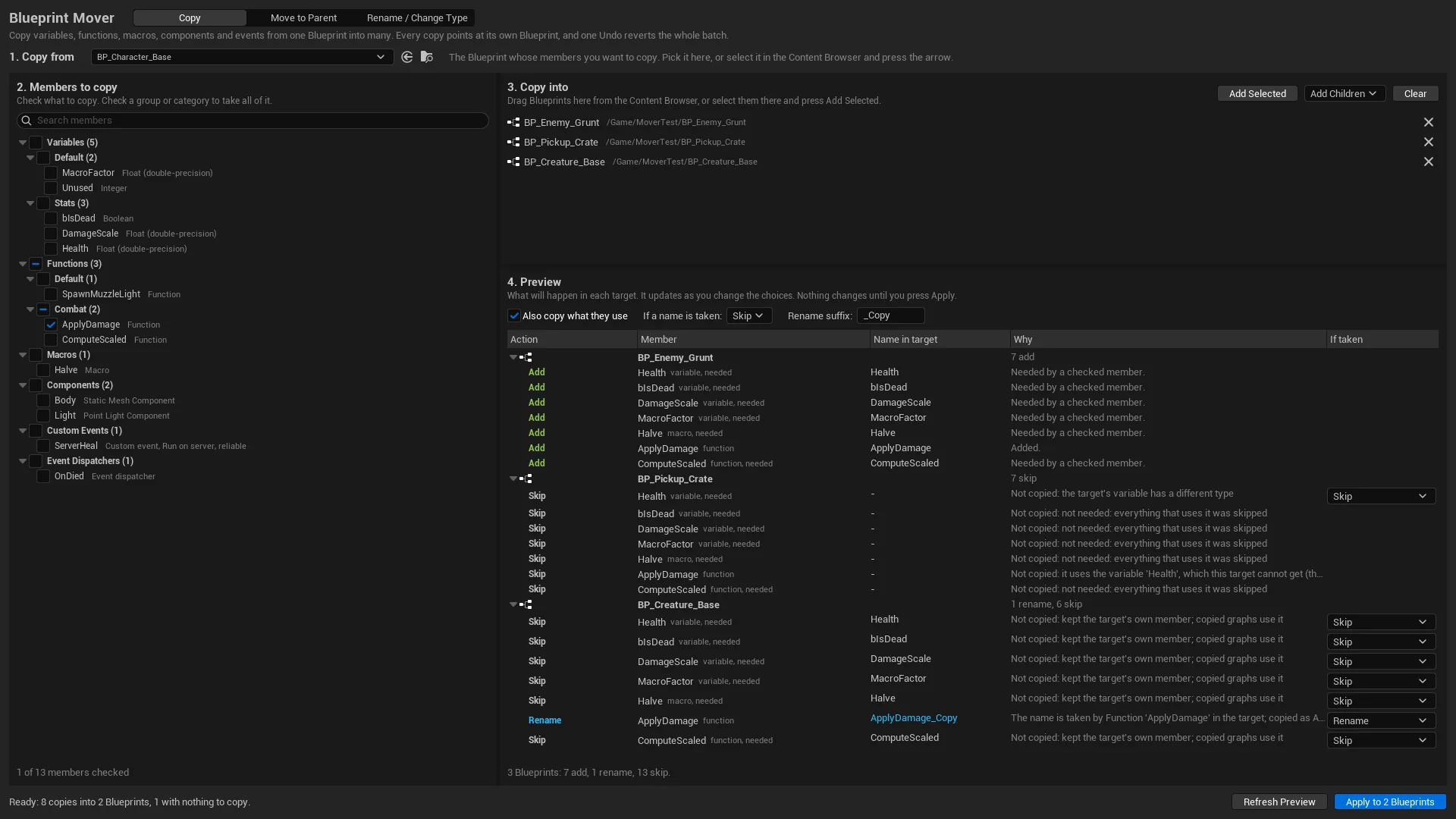
Copy
Pick the source, check members, drag in the targets. The preview groups its rows by target, and each row says what will happen and why.
- 1. COPY FROMThe source Blueprint. Pick it, or select it in the Content Browser and press the arrow.
- 2. MEMBERS TO COPYGrouped by kind and category, with search. Check a group to take all of it.
- 3. COPY INTODrag targets in from the Content Browser, or use Add Selected or Add Children.
- 4. PREVIEWOne row for each member in each target: the action, the name in the target, and why.
Colors in the preview
- AddCopied.
- RenameCopied under a new name.
- ReplaceReplaces the target's own member.
- SkipNot copied. The target keeps its own.
- Not supportedThis kind of Blueprint can't hold it.
- RefusedThe copy would break. The row says what.
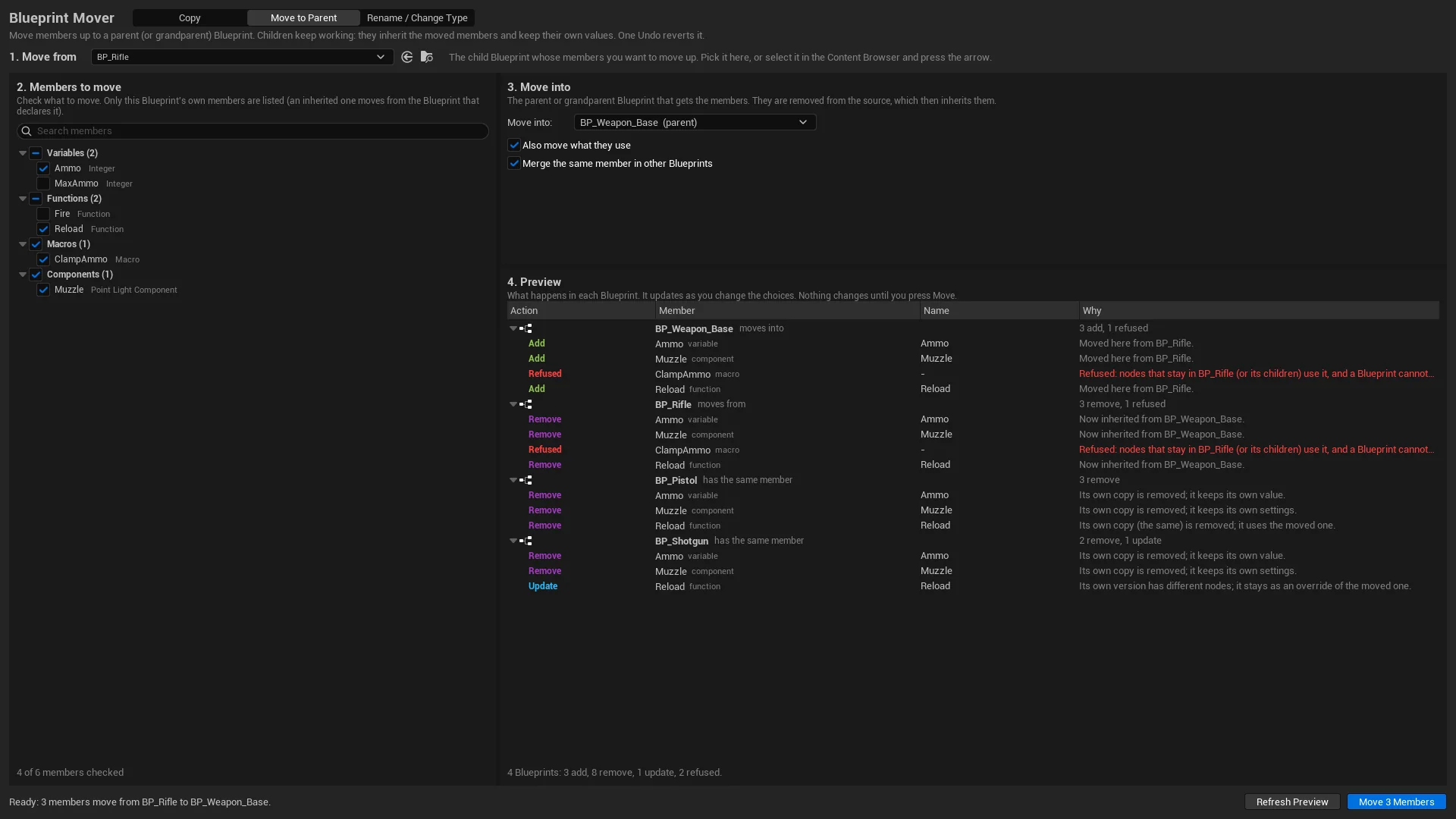
Move to Parent
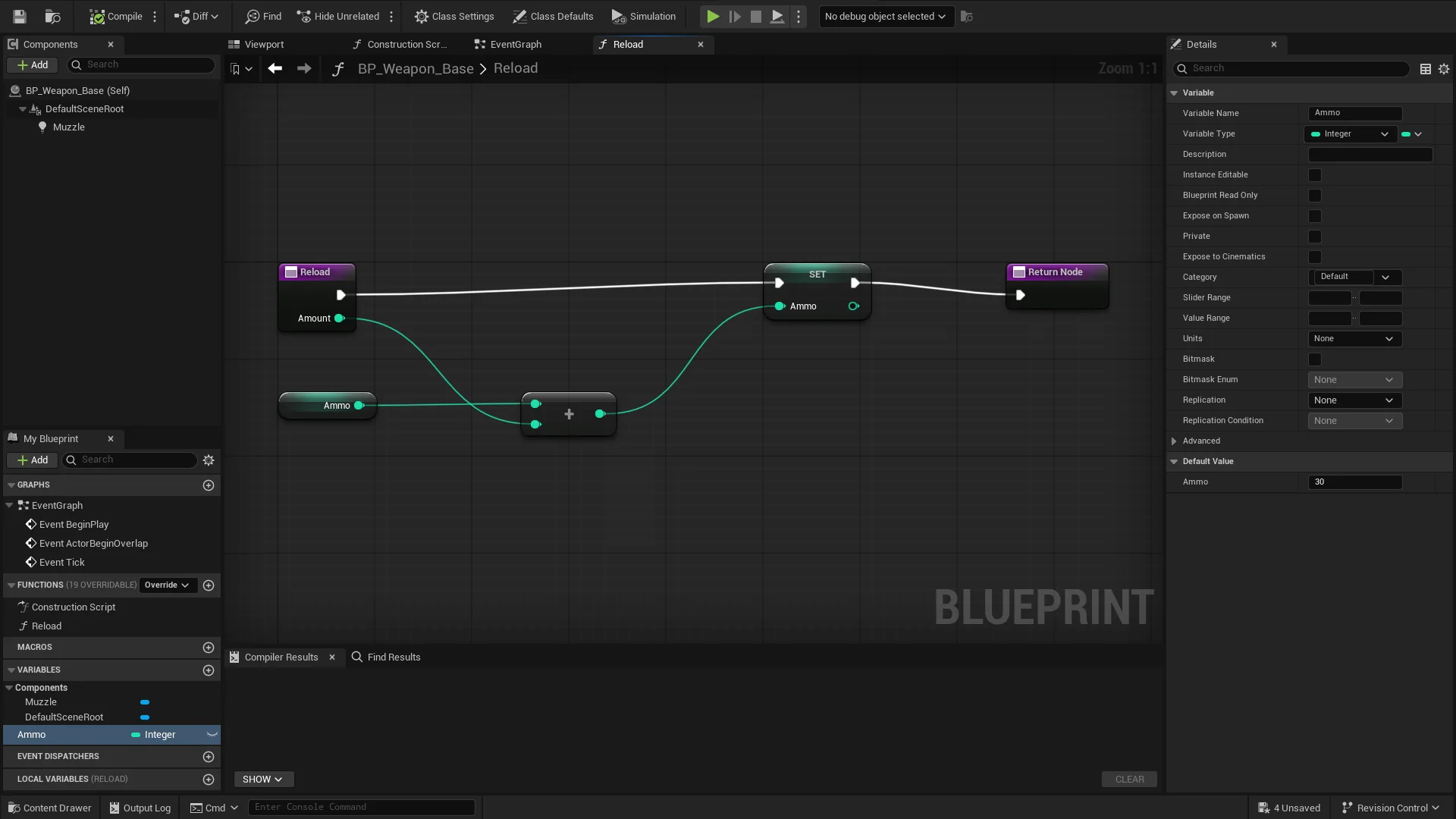
BP_Rifle moves Ammo, Reload and Muzzle into its parent. BP_Pistol had the same members, so its copies go. BP_Shotgun's Reload has different nodes, so it stays as an override. The macro ClampAmmo is refused because nodes that stay in BP_Rifle still use it.
- 1. MOVE FROMThe child Blueprint whose members move up.
- 2. MEMBERS TO MOVEOnly its own members. An inherited one moves from the Blueprint that declares it.
- 3. MOVE INTOThe parent or grandparent, plus two options: move what they use, and merge the same member in other children.
- 4. PREVIEWEvery Blueprint involved, with its role: moves into, moves from, or has the same member.
Colors in the preview
- AddAdded to the parent.
- RemoveA child's own copy goes. It inherits the moved one and keeps its own value.
- UpdateA version with different nodes stays as an override.
- RefusedCan't move. The row says why, and the rest still moves.
Rename / Change Type
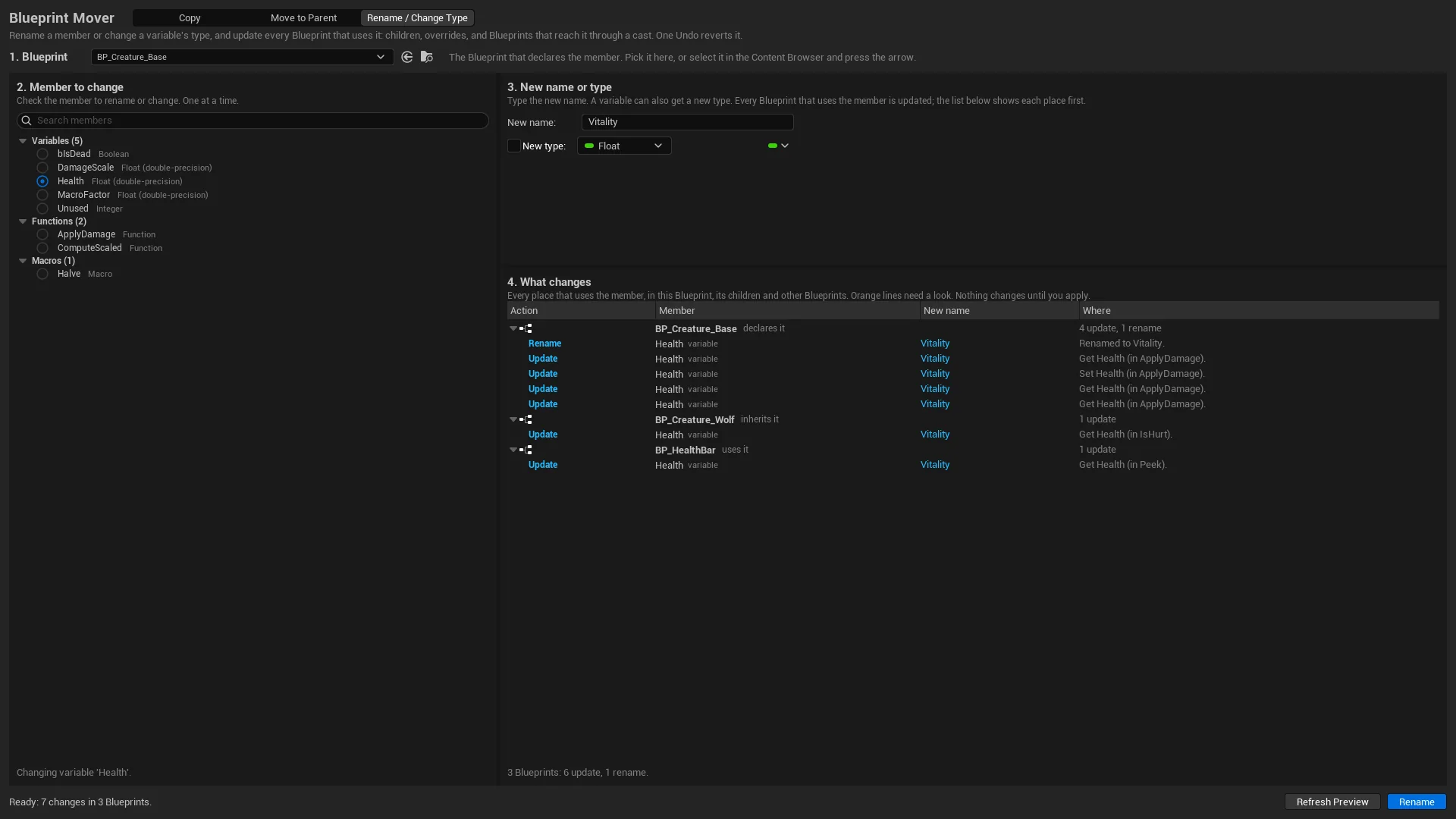
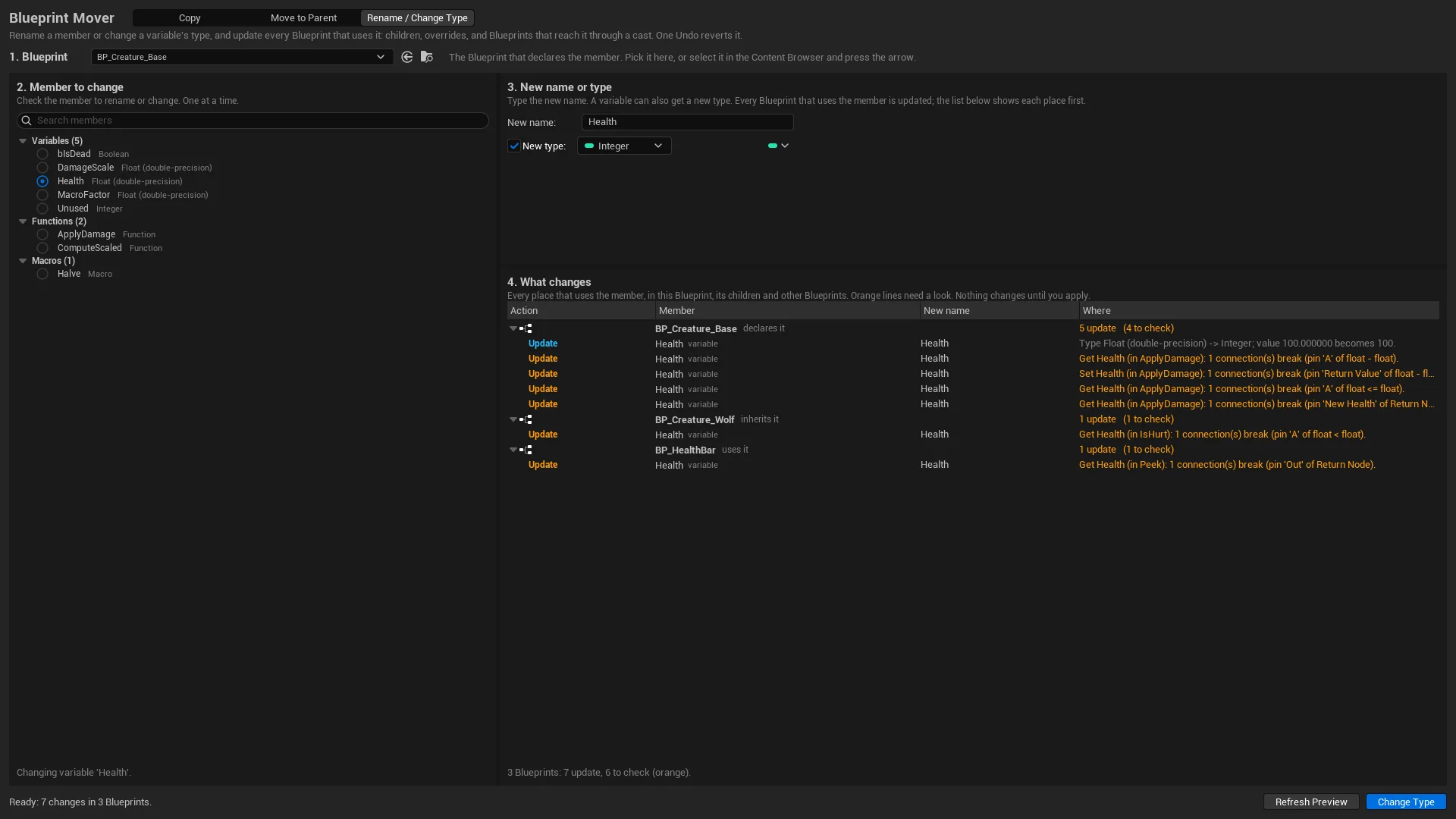
The list shows every place that uses the member: in the Blueprint that declares it, in a child that inherits it, and in a health bar that reads it through a reference. A type change marks the connections it will remove in orange, before anything changes.
- 1. BLUEPRINTThe Blueprint that declares the member.
- 2. MEMBER TO CHANGEOne member at a time.
- 3. NEW NAME OR TYPEType a new name. Check New type to change a variable's type.
- 4. WHAT CHANGESEvery node and setting that uses it, with where it is.
Colors in What changes
- RenameThe member gets the new name.
- UpdateA node or setting that uses it is updated.
- UpdateOrange: a connection the new type can't keep. It will be removed.
Tested on Unreal Engine 5.6 to 5.8
Each test builds its own Blueprints, runs a copy, move or rename, and checks the result.
Test results, release candidate 1.0.0
2026-11-10. On each engine, 155 automated tests (4,428 checks) run without an editor window. They check compile results, saving, reloading from disk, undo and redo, every re-pointed reference, and that copied functions return the same values as the source. Three more tests click through the real panel with mouse and keyboard input (422 checks), with Blueprint editors open during Move to Parent. A shutdown test quits the editor the normal way and checks that it exits cleanly.
These suites ran on the release candidate. The shipping zips add one later change, the wording of the copy status line and the Apply button. UE 5.7 re-ran the two tests that cover it (21 of 21 and 118 of 118 checks), and each shipping zip passed the install test below on its own engine.
| Engine | Tests | Checks | Click checks | Failed |
|---|---|---|---|---|
| UE 5.6.1 | 155 | 4,428 | 422 | 0 |
| UE 5.7.4 | 155 | 4,428 | 422 | 0 |
| UE 5.8.3 | 155 | 4,428 | 422 | 0 |
Release and stress checks
- Install: each shipping Fab zip was installed into a blank project on its own engine, built and opened, and passed 30 of 30 checks on UE 5.6, 5.7 and 5.8.
- Strict build: each zip's source compiled file by file, without precompiled headers or a unity build, with 0 errors and 0 warnings from the plugin.
- Plugin off and on: turning the plugin off and on again in the editor passed twice on each engine.
- Random stress runs: a test takes random steps (copy, move, rename, undo and redo on random Blueprints) from a fixed seed, so any failure can be replayed. 2,000-step runs passed on UE 5.6, 5.7 and 5.8, and 300-step runs through the panel with Blueprint editors open passed on all three. More seeds passed on UE 5.7 and 5.6. Every bug these runs found is fixed and has its own test.
- Scale: a copy into 1,000 Blueprints in one batch, then Undo and Redo; a rename used by 500 Blueprints; a move through a deep hierarchy; and Cancel in the middle of a batch, which rolls everything back.
- Editor start and quit: 20 cycles in a row on each engine, each opening the panel and running one operation, all exiting cleanly.
Limits in version 1.0.0
Where Blueprint Mover stops, and what no test covers yet.
- Actors placed in levels: Rename / Change Type updates Blueprint assets. Not tested yet: values set on actors placed in a level for a renamed variable, and Level Blueprints that are not open. Check those by hand after a rename.
- Large projects: before its first preview, Rename / Change Type loads every Blueprint that references the one you change. In the stress runs, a rename used by 500 Blueprints took a few seconds. With thousands of them, that first preview may be slow.
- Macros and parents: a Blueprint can't use its parent's macros (an Unreal limit). Move to Parent refuses a macro that nodes staying in the child still use. Move those nodes too.
- Merging: another child's different function stays as an override only when its inputs and outputs match exactly. Otherwise the member is refused. Macros and custom events with different nodes are refused.
- Private members: Move to Parent refuses a private member that nodes staying in the child still use, because a child Blueprint can't use its parent's private members. Make it public first, or move those nodes too.
- Overrides: a function that overrides a parent function is copied only into Blueprints that inherit that function.
- Type changes: a type change that would disconnect an input that must stay connected, such as a node's Target, is refused. Connect that input to something else first.
- Not offered yet: event graph events such as BeginPlay, and components a Blueprint inherits from its parent. A custom event inside a collapsed graph is refused, and comment boxes around copied nodes are not copied.
- Blueprint Interfaces: refused as Copy targets. Renaming an interface function is not supported yet.
- Not tested: Animation Blueprints and Control Rig.
- Names typed as text: a function name in a text field, as in Set Timer by Function Name, is listed as a warning and not renamed.
- Saving: Apply compiles but does not save. Use source control or a backup before a big change.
- Platform: Windows only (Mac and Linux are not supported), in the editor. The panel is in English.
- Engines: UE 5.6 to 5.8. UE 5.5 and older are not supported.
The full guide
Every mode step by step, the supported types, undo, settings and limits, on one page.
Support
Questions or a bug? Write to support@barbedwireglovegames.games. Include your engine version and the text from Copy Report.
Fab listing: Blueprint Mover on Fab.
Version
1.0.0, the first release. The changes are in the changelog.