

The Ultimate 2D Sprite Effects Bundle is a content pack for Unreal Engine (UE) 5.4 to 5.8. It has 150 effects for Paper2D sprites, flipbooks and UMG images: 146 sprite materials, 2 post-process materials and 2 Niagara systems. Each sprite effect is a material function behind a switch in a master material, and every effect has a ready preset (a material instance). There is no C++ code.
Version 1.0.0. Checked in the Windows editor on UE 5.4, 5.5, 5.6, 5.7 and 5.8, in a packaged Windows build, and added to two new UE 5.4 projects. The shaders also compile for Android. Mac, Linux, iOS and Android devices are not tested yet. Where something else is not tested, this guide says so.
| Word | Meaning in this guide |
|---|---|
| Preset | A material instance with one effect switched on and tuned, for example MI_SpriteFX_OuterOutline. |
| Master | The parent material a preset is made from. Each master holds the effects of one category, each behind its own Use <Effect> switch. |
| Texel | One pixel of the sprite's texture. Many sizes in this pack are in texels, so they stay the same however large the sprite is drawn. |
| Padding | Transparent pixels around the art inside the sprite's frame. Effects that draw past the art draw into this space. |
| Masked, translucent | Masked materials draw each pixel fully or not at all, which is cheaper and sorts cleanly. Translucent materials can draw soft, half-transparent pixels, which glows and fades need. |
1. Getting started
1.1 What's in the pack
Everything sits in one folder, Content/SpriteFX:
| Folder | What is in it |
|---|---|
Instances | 148 sprite presets, MI_SpriteFX_<Effect>. Start here. |
Instances/UI | 141 presets for UMG images, MI_SpriteFX_<Effect>_UI. |
Instances/Lit | 25 lit presets for 3D scenes, MI_SpriteFX_<Effect>_Lit. |
Materials | 20 sprite masters: a masked and a translucent one per category, the refraction master and the post-process master. Materials/UI has the 9 UMG masters and Materials/Lit the 10 lit masters. |
Functions | 158 material functions: one per effect plus the shared helpers. |
Blueprints | The effect helpers (BPC_SpriteFX, BPC_SpriteFX_Afterimage, BPC_SpriteFX_Billboard, BP_SpriteFX_Light2DSync, BP_SpriteFX_DayNight) and, in Blueprints/UI, WBP_SpriteFXImage. The rest are demo Blueprints. |
Niagara | NS_SpriteFX_PixelBurst, NS_SpriteFX_EdgeSparks and their two particle materials. |
ParameterCollections | MPC_SpriteFX_Lights2D and MPC_SpriteFX_DayNight. |
Textures, Demo, Maps | Helper textures (ramp, palette, LUT, overlay, flat normal), the demo art, and the five maps. |
1.2 Plugins
- Open Edit > Plugins.
- Make sure Paper2D and Niagara are on. Both come with Unreal Engine.
- Restart the editor if it asks.
1.3 Custom Depth, for Group Outline and Behind-Wall Silhouette
Two effects, Group Outline (10) and Behind-Wall Silhouette (11), are post-process materials that read the custom depth and stencil buffers. Without the setting these two do not show, and nothing else changes; no error appears. Every other effect works without it.
- Open Project Settings > Rendering and set Custom Depth-Stencil Pass to Enabled with Stencil (type "custom depth" in the search box to find it). In
DefaultEngine.inithis isr.CustomDepth=3. Add to Project copies the pack but not project settings, so set it in your project. - On every sprite or flipbook of a group, open Details > Rendering, turn on Render CustomDepth Pass, and set CustomDepth Stencil Value to the group's number (1 to 255). Give every part of one character the same number: the outline then goes around all the parts together, never between them.
- Add
MI_SpriteFX_GroupOutlineorMI_SpriteFX_BehindWall(or a child of either) to a Post Process Volume under Rendering Features > Post Process Materials. Tick Infinite Extent (Unbound) on the volume to cover the whole level, or add the material to a camera's post process settings. - Behind-Wall Silhouette needs a wall that writes depth: an opaque or masked material, such as walls, tiles or masked sprites. Raise Depth Bias (in world units) if a sprite hides itself.
- Sizes in these two are in screen pixels (Thickness, Edge Width, Pattern Scale). Stencil Value 0 outlines every group. Per Stencil Colors gives stencil values 1 to 4 their own colors, for teams or rarity.
On mobile, these two also need Mobile HDR on in Project Settings.
1.4 Sprite setup: render geometry and padding
An effect can only draw inside the sprite's own rectangle. Outlines, glows, flames, shadows and other effects that reach past the art draw into the transparent border around it. Measured on the overview map, 60 of the 144 sprite effects reach past the art. Two things keep that border:
- Render Geometry. In the sprite editor, set Render Geometry to Source Bounding Box. Tight Bounding Box and Shrink Wrapped trim the transparent border away, and the effect is cut off with it.
- Padding. Give each sprite, and each frame of a sprite sheet, at least as many transparent pixels as the effect reaches: for an outline, its thickness; for a glow, its radius. Section 8.4 lists what each of them needs.
The demo pixel art uses these texture settings: Filter Nearest, no mipmaps, compression UserInterface2D (RGBA), texture group 2D Pixels (unfiltered), and Clamp addressing. HD art can keep its default settings.
1.5 The maps
L_SpriteFX_StartHere- Open this map first. The setup steps, the list of maps, and six effects to look at first.
L_SpriteFX_Overview- Every effect on a pixel-art knight and an HD gem, labelled with its number, in eight category blocks. A scene row shows the effects that need a scene (Group Outline, Behind-Wall Silhouette, 2D Point Lights, Day/Night Tint, Light Shafts, Cloud Shadows, Heat Shimmer and the cloak, Sharp-Pixel Smoothing). Press Play to see the two Niagara effects in their corner.
L_SpriteFX_Demo_BlueprintsBPC_SpriteFXon a knight and a gem, the afterimage trail, 2D point lights and the day and night clock. Each area is labelled. In Play the map runs by itself: loopers replay Pixel Burst, Edge Sparks, a dissolve with and without a curve, and the health tint, and a moving runner shows the afterimage trail.L_SpriteFX_Demo_UMG- A game screen built with
WBP_SpriteFXImage: inventory icons, a trading card, buttons with hover effects, a health orb and an ability cooldown. Press Play and move the mouse over it. L_SpriteFX_Demo_25D- Lit pixel-art sprites in a small 3D scene with a moving sun, a torch, fog and cast shadows, plus a grid of every lit preset.
2. Sprites and flipbooks
2.1 Put a preset on a sprite
- Select the sprite or flipbook actor in your level, or its component in a Blueprint.
- In Details > Materials, set Element 0 to a preset from
SpriteFX/Instances. - Paper2D passes the sprite's texture to the material on its own, through the
SpriteTextureparameter. Don't rename that parameter in your own copies.
On a flipbook, set the material on the flipbook component. It replaces the materials of the frames. The effects work in the sprite's own space, so a dissolve pattern, a shine or a mask stays on the art while the frames change.
2.2 Make your own preset
Right-click a preset and choose Create Material Instance. Open the new instance and change its values. Parameters are grouped: 00 Sprite holds the textures, 01 Global the shared settings, 02 Mask A and 03 Mask B the masks, and each effect has its own group with its name, numbered from 10. Section 6 explains the controls every effect shares.
2.3 Use several effects on one sprite
Each master holds every effect of its category. Open a preset, tick more Use <Effect> switches, and set their values. Switches that are off are compiled out, so they cost nothing.
- The Core masters (
M_SpriteFX_Core_Maskedand_Translucent) hold the most used effects from several categories: Outer Outline, Outer Glow, Shine Sweep, Hit Flash, Tint, Hue Shift, Palette Swap, Wave, Dissolve, Fade, Burn Away, Shatter, Damage Blink and Freeze. Use Core when one sprite needs, for example, a hit flash, a dissolve and an outline together. - Inside a master, the effects run in a fixed order: distortions first, then exact-color effects (palette swap, change one color), then the sprite's vertex color, then color effects, then edge effects (outlines, glows), then transparency (dissolves, fades).
- Every effect you add costs shader time. The demo material
MI_SpriteFX_Demo_HelperCore, with Hit Flash, Dissolve, Freeze, Burn Away, Shine Sweep and Shatter all on, costs 1,274 pixel shader instructions. Turn on only what a sprite uses (section 8).
2.4 Masked or translucent
Every category has a masked and a translucent master. Masked is cheaper and sorts with depth like a solid object. Translucent can draw soft, half-transparent pixels, which soft outlines, glows, blurs, fades and smoke need. Each preset already uses the right one.
2.5 The material functions
Each effect is also a material function, MF_SpriteFX_<Effect>, listed in the material editor's palette under SpriteFX. Most take a color in and give a color out, and distortions take sprite coordinates in and give coordinates out, so you can chain them in a material of your own. The helpers (MF_SpriteFX_PixelSnap, _SpriteCoords_Paper2D, _SampleAtCoords, _Mask, _AnimTime and others) are the same ones the masters use. Open a master to see how they are wired.
2.6 Pixel art
- Pixel Snap (in
01 Global, on in every preset) makes outlines, glows, dissolves and patterns step in whole texels, so they match the art's pixels. - Sharp-Pixel Smoothing (110) keeps pixel art crisp when it moves, scales or rotates by fractions of a pixel: each texel stays sharp, with a one-screen-pixel blend at its edges. Turn Pixel Snap off on the material that uses it. Distortion effects do not apply in that material.
- Edge Smoothing (51) rounds the stair-steps of a scaled-up silhouette instead.
3. UMG images
141 effects also come as User Interface materials, with a preset each in Instances/UI. They use the same effect functions and parameter names as the sprite versions.
3.1 WBP_SpriteFXImage
- Add
WBP_SpriteFXImageto your widget. - Set Texture to your image and EffectMaterial to a
_UIpreset, for exampleMI_SpriteFX_ShineSweep_UI. The designer shows the effect right away. - Optional: set MaskTexture for effects that use a mask texture (mask type 1), such as Liquid Fill inside a bottle.
- Call its functions from your widget's graph (section 5.5). For hover effects, turn on ReactToHover and set the widget's Visibility to Visible.
To use a _UI preset on a plain Image instead, make a child of the preset, set its SpriteTexture to your image, and use the child as the Image's brush.
3.2 Cards, buttons and the mouse
- Card Tilt (104) and Holographic Foil (103) follow a tilt in X and Y (
Tilt Tilt X,Tilt Tilt Y,Foil Tilt X,Foil Tilt Y). Set them from the mouse position with SetScalar, or turn on Auto Tilt or Auto Shimmer for a hands-off sway. - Card Tilt is made for cards and UI art of about 48 pixels and up. On smaller sprites a strong tilt looks smeared; keep
Tilt Perspectiveat 0.5 or less there. - SetHover on
WBP_SpriteFXImageturns an outline on and plays one shine sweep, for buttons.
3.3 Effects without a UMG version
| Effect | Why |
|---|---|
| 10 Group Outline, 11 Behind-Wall Silhouette | Post-process effects: they work on the whole screen, not on a widget. |
| 19 2D Point Lights | The lights have world positions, and a widget has no world. |
| 71 Squash and Stretch, 72 Jelly Wobble | They move the sprite's vertices. On a widget, use its Render Transform. |
| 73 Heat Shimmer, 98 Invisibility Cloak | They read the scene behind the sprite, and a UI material has no scene to read. |
| 149 Pixel Burst, 150 Edge Sparks | Niagara systems, for sprites in the level. |
4. Lit and 2.5D
The lit masters put sprites into lit 3D scenes: the art takes light from your scene's lights and casts shadows, while what an effect adds on top (a glow, a flame, a flash, an outline) stays bright.
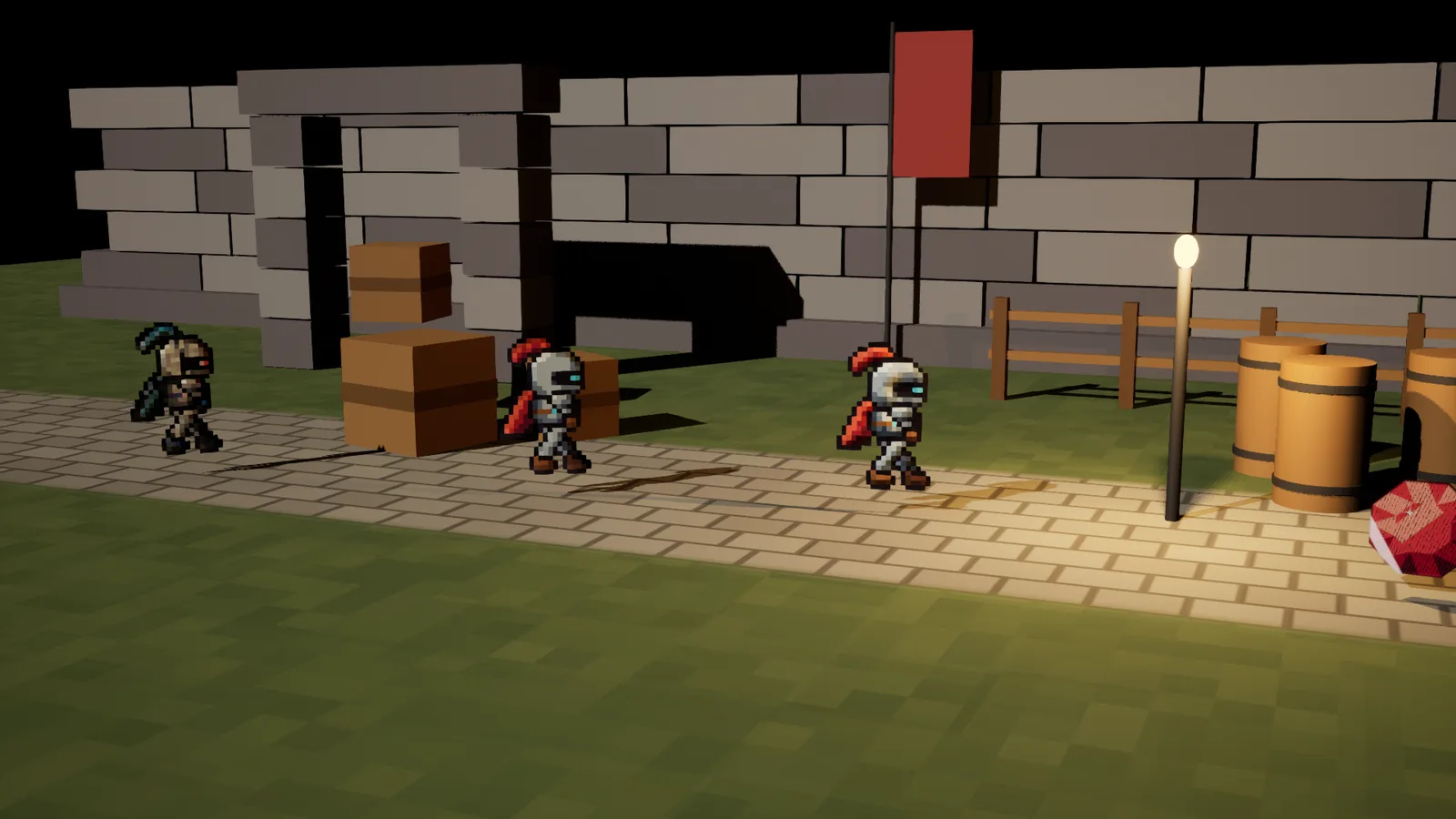
L_SpriteFX_Demo_25D in Play, UE 5.7: lit knights turned to the camera by BPC_SpriteFX_Billboard, casting sun shadows.4.1 Lit presets and masters
- 25 presets are ready in
Instances/Lit: the 14 Core effects and 11 status looks. - The lit masters are in
Materials/Lit:M_SpriteFX_<Category>_Lit_Maskedand_Lit_Translucentfor Core, Color, Stylize, Transition and Status. 88 effects can use them. - To light another preset from those categories, reparent it to the
_Lit_master of its category. The parameter names are the same, so its values carry over. The effect reference says which master and switch each effect needs. - The Outline, Glow and light, Distort and UI categories have no lit masters; those looks are meant to stay unlit. Outer Outline, Outer Glow and Wave are in the lit Core masters.
The lit masters add a 02 Lighting group:
| Parameter | Default | What it does |
|---|---|---|
| Effect Glow | 1 | How bright the light the effects add stays (glows, flames, flashes, outlines). |
| Unlit Floor | 0 | Share of the art that lights itself, so sprites stay readable in the dark. |
| Use Normal Map | off | Reads a normal map from the sprite's Additional Textures, slot 0. Off: flat normals plus the bevel below. |
| Normal Map Strength | 1 | How strongly the normal map tilts the surface. |
| Bevel Width | 2 | Texels of rounded edge, made from the sprite's alpha. No hand-made normal map needed. |
| Bevel Strength | 1.2 | How far the bevel tilts the edges toward the light. |
| Roughness, Specular | 0.8, 0.3 | The usual surface settings. |
4.2 Masked or translucent lit
Lit masked casts crisp shadows from the alpha and costs about 350 to 380 pixel shader instructions with no effect on. Lit translucent lights every pixel on its own and costs about 1,870 to 1,910. Use lit masked unless you need soft edges, and on mobile especially. Lit translucent sprites still cast shadows as if masked.
4.3 Set up a 2.5D sprite
- Give the sprite a lit preset or a lit master.
- Turn on Cast Shadow on the sprite component.
- Add
BPC_SpriteFX_Billboardto the actor. Each frame it turns the sprite around its vertical axis to face the camera, so the shadow comes from the way the sprite really faces. Leave Camera empty to face player 0's camera, or set an actor to face. YawOffset fixes art that was drawn facing another way. - Masked lit sprites get height fog like other surfaces; translucent ones are fogged per pixel.
No shadows? Check Settings > Engine Scalability in the editor. At Low, Unreal draws no dynamic shadows at all.
5. Blueprint helper
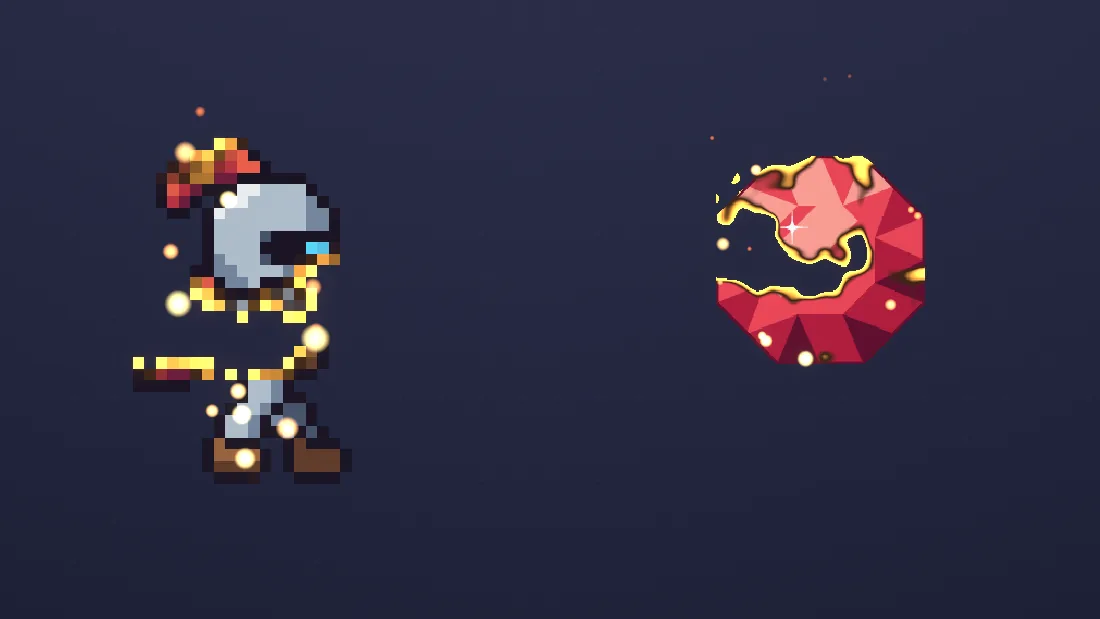
BPC_SpriteFX is an actor component that plays effects on a sprite or flipbook from Blueprint. It makes a dynamic material instance on first use and drives its parameters over time.
5.1 Add it
- Add
BPC_SpriteFXto the actor that owns the sprite. - Give the sprite a material that has the effects you want to play switched on. For the shortcut functions below, a Core preset or a Core master with those switches on works.
- Call its functions from the actor's graph.
| Setting | Default | What it does |
|---|---|---|
| TargetComponent | empty | The component to drive, such as a sprite or flipbook. Empty uses the owner's first primitive component. |
| MaterialIndex | 0 | The material slot that gets the dynamic material. |
| AutoInstanceSeed | on | Gives this sprite its own random Instance Seed, so a crowd does not animate in sync. |
| DriveFrameBlend | off | Feeds the flipbook's position between frames to Flipbook Frame Blend (128). |
| MaxHealth | 100 | SetHealth divides by this (Health Visualize, 140). |
| SpriteTexture, SpriteRect | empty, (0, 0, 1, 1) | The texture Pixel Burst and Edge Sparks read, and the sprite's rectangle in it (min U, min V, max U, max V). Required for those two. |
| PixelsPerUnit | 1 | The sprite's Pixels Per Unit (the Paper2D default is 1). |
| SheetColumns, SheetRows | 0, 1 | For flipbooks: frames per row and rows in SpriteTexture. When set, Pixel Burst and Edge Sparks read the current frame (frames left to right, top to bottom, in playback order). 0 columns always uses SpriteRect. |
| PixelStep | 1 | Texels per art pixel: 1 for pixel art, 2 to 4 for HD sprites (fewer, bigger particles). |
| HideOnPixelBurst | on | Hides the sprite when it bursts. |
| SparksOnBurnDissolve | on | Burn and Dissolve also play Edge Sparks for their duration. |
| PixelBurstSystem, EdgeSparkSystem | the pack's systems | The Niagara systems used. Swap in your own copies if you change them. |
5.2 Functions
| Function | What it does |
|---|---|
| PlayEffect (Parameter, From, To, Duration, Loop Mode, Curve) | Animates any scalar parameter from From to To over Duration seconds. Loop Mode 0 plays once, then fires OnEffectFinished; 1 loops; 2 goes back and forth. Curve is optional and reshapes the 0 to 1 progress. |
| StopEffect, PauseEffect, ResumeEffect | Stop the running effect where it is, pause it, or resume it. |
| OnEffectFinished (Parameter) | Event dispatcher. Fires when a once effect ends, with the parameter it played. |
| SetScalar (Parameter, Value), SetColor (Parameter, Value) | Set one parameter on the sprite's dynamic material. |
| GetEffectMaterial | Returns the dynamic material the component drives. It is made on first use and works on flipbooks. |
| SetHealth (Health) | Health Visualize (140): sets its health value to Health divided by MaxHealth. |
| PixelBurst | Spawns Pixel Burst (149) at the sprite and hides the sprite. |
| EdgeSparks (Duration) | Sparks along the sprite's outline for Duration seconds (0 means 1.5). Needs SpriteTexture. |
| UpdateSpriteRect, SetSpriteParams (System) | Read the flipbook's current frame into the rectangle, or pass the texture, rectangle and Pixels Per Unit to a Niagara component of your own. |
5.3 Shortcuts
Each shortcut is PlayEffect on one parameter, played once. Duration 0 uses the default. The sprite's material needs that effect switched on.
| Function | Effect | Parameter | From, to | Default duration |
|---|---|---|---|---|
| Flash | 24 Hit Flash | Flash Amount | 1 to 0 | 0.25 s |
| Dissolve | 75 Dissolve | Dissolve Amount | 0 to 1 | 1 s |
| Freeze | 92 Freeze | Freeze Amount | 0 to 1 | 0.6 s |
| Burn | 84 Burn Away | Burn Amount | 0 to 1 | 1.5 s |
| Shine | 15 Shine Sweep | Shine Position | 0 to 1 | 0.6 s |
| Shatter | 88 Shatter | Shatter Amount | 0 to 1 | 1.5 s |
5.4 Example: flash on hit, dissolve on death
- Give the sprite a child of a Core preset with Use Hit Flash and Use Dissolve ticked.
- In the actor's damage event, call Flash on the
BPC_SpriteFXcomponent with Duration 0. - When health reaches zero, call Dissolve with Duration 1, and bind OnEffectFinished to destroy the actor once Parameter is
Dissolve Amount.
To animate any other effect, call PlayEffect with its parameter name from the effect reference, for example Outline Strength from 0 to 1 over 0.3 seconds.
5.5 WBP_SpriteFXImage functions
The UMG helper shares PlayEffect, StopEffect, PauseEffect, ResumeEffect, OnEffectFinished, SetScalar, SetColor and GetEffectMaterial with BPC_SpriteFX, and adds:
| Function | What it does |
|---|---|
| Flash, Dissolve, Shine | As on sprites: 0.25 s, 1 s and 0.6 s by default. |
| Appear | Dissolves the image in (Dissolve Amount 1 to 0, 0.6 s). |
| Cooldown | Cooldown Sweep from just used to ready (Cooldown Amount 0 to 1, 3 s). |
| SetFill (Level, Duration) | Liquid Fill: animates Liquid Level from its current value to Level. |
| SetHover (Hovered) | For buttons: outline on or off, and one shine sweep on hover. |
| ApplyBrush | Rebuilds the dynamic material from EffectMaterial, Texture and MaskTexture, after you change them at runtime. |
5.6 The other helpers
BPC_SpriteFX_Afterimage- Leaves fading ghost copies of the sprite, or of the flipbook's current frame, while Active is on: one every Interval (0.06 s), each living Lifetime (0.35 s), offset by DepthOffset so it sits behind the sprite. GhostMaterial sets their look. SpawnGhost spawns one now. This is separate from the Afterimage material effect (143).
BPC_SpriteFX_Billboard- Turns the sprite to face the camera around its vertical axis (section 4.3).
BP_SpriteFX_Light2DSync- For 2D Point Lights (19). Place it in the level and give up to 8 Point Lights the actor tag
SpriteFXLight2D. Each frame it copies their location, Attenuation Radius, Light Color and Intensity intoMPC_SpriteFX_Lights2D, which lights unlit sprites with no engine lighting needed. Turn on RefreshEveryTick for lights spawned during play. BP_SpriteFX_DayNight- For Day/Night Tint (20). Runs the clock in
MPC_SpriteFX_DayNight: TimeOfDay (0 midnight, 0.25 sunrise, 0.5 noon, 0.75 sunset), DayLengthSeconds (120), Paused and an optional TimeCurve. SetTimeOfDay jumps to a time, and Lightning plays a flash that fades out. A material with Day Night Fixed Time above -1 keeps one time of its own, for interiors or UI. - Demo only
BP_SpriteFX_DemoLooper,BP_SpriteFX_UIDemoScreen,WBP_SpriteFXDemo,WBP_SpriteFXUISheet1and2build the demo maps.
6. Customization standard
The controls share the same names and the same layout wherever they apply, but not every effect has every group. All 146 sprite materials have Strength and 144 have the masks; 98 can animate, 69 have a color mode and 22 have a pattern space. Parameter names start with the effect's short name, for example Outline Strength or Dissolve Amount. The effect reference lists each effect's full set.
6.1 Strength and masks: where it applies
- <Effect> Strength (0 to 1): how much of the effect is applied.
- <Effect> Mask: 0 the whole sprite, 1 Mask A, 2 Mask B, 3 where A and B overlap, 4 where either is. <Effect> Mask Invert 1 applies the effect outside the mask.
- Masks A and B are switched on in
01 Global(Use Mask A, Use Mask B). Each has a Type:
| Type | Selects | Settings |
|---|---|---|
| 0 Color pick | Pixels close to one color, for example only the cape. | Color, Tolerance, Softness |
| 1 Mask texture channel | Where a mask you paint is bright, in its R, G, B or A channel. On sprites the mask goes in the sprite's Additional Textures, slot 1. | Channel |
| 2 Region box | A rectangle of the sprite, in 0 to 1 sprite space, with a soft edge. | Box Min X, Box Min Y, Box Max X, Box Max Y, Softness |
| 3 Gradient region | A vertical, horizontal or radial gradient. | Gradient Mode, Gradient Position, Gradient Falloff, Center X, Center Y |
Each mask also has Invert. Masks do not steer Squash and Stretch or Jelly Wobble, which move the whole sprite; Strength still does.
6.2 Color
- Every color is a parameter. Values above 1 glow, and bloom picks them up.
- <Color> Mode: 0 flat, 1 a gradient across the sprite to <Color> 2, 2 a pulse between the two over time, 3 the Color Ramp texture across the sprite, 4 the ramp over time. <Color> Angle sets the gradient's direction in degrees.
- Overlays have a Blend Mode: 0 normal, 1 add, 2 multiply, 3 screen, 4 overlay.
6.3 Animation
- <Effect> Animate: 0 loop, 1 ping-pong, 2 once (starting at Time Offset), 3 manual.
- Speed, Time Offset and Duration (the length of one cycle) shape the timing. In manual mode, set Progress (0 to 1) yourself, for example with SetScalar or PlayEffect.
- Transitions, flashes, shines and fills start in manual mode, so they wait for your Blueprint. Switch them to loop, ping-pong or once to run on their own.
- Directions are angles in degrees.
6.4 Shape and space
- Sizes such as thickness, width and radius are in texels where the reference gives the type as texels, so they hold their look at any scale.
- Pattern effects (noise, scanlines, clouds and others) have <Effect> Space: 0 sprite, 1 world, 2 screen. In world space one pattern runs across every sprite, for example one cloud layer passing over a whole level. World Pattern Size and Screen Pattern Size in
01 Globalset the repeat.
6.5 Global settings (01 Global)
| Setting | What it does |
|---|---|
| Pixel Snap | Switch. On for pixel art: effects step in whole texels. |
| Mobile Quality | Switch. Fewer samples for outlines, glows, blurs and shadows. |
| Use Mask A, Use Mask B | Switches. Turn the two mask slots on. |
| Global Anim Speed | Speeds up or slows every effect on the material. 0 freezes them at Global Time Offset. |
| Global Time Offset | Shifts every effect in time. |
| Instance Seed, Random Time Offset | A different seed per sprite plus a few seconds of random offset keep a crowd from pulsing in sync. BPC_SpriteFX sets the seed for you. |
| World Pattern Size, Screen Pattern Size | World units or screen pixels per pattern repeat, for Space 1 and 2. |
The textures sit in 00 Sprite: SpriteTexture (Paper2D fills it), the normal map (SpriteAdditionalTexture_0, the sprite's Additional Textures slot 0), the mask (SpriteAdditionalTexture_1, slot 1), Color Ramp, Overlay Texture, Color LUT and Palette Texture.
7. Effect reference
The effect reference lists all 150 effects by category. For each one it gives a line on what it does, its preset and master, whether it has a UMG and a lit version, the padding it needs, mobile notes, the pixel shader cost of its preset, and every parameter with its type, default and range. Search it by name or parameter, or filter by category, UMG, lit, padding and mobile.
8. Performance and mobile
8.1 Shader cost
Pixel shader instruction counts, measured in UE 5.7 for Windows (Shader Model 6). Lower is cheaper. The master counts are with every effect switched off.
| What | Range | Median |
|---|---|---|
| Sprite presets (148) | 120 to 581 | 228 |
| UMG presets (141) | 73 to 511 | 157 |
| Lit presets (25) | 437 to 2,083 | 566 |
| Sprite masters, masked and translucent | 96 to 178 | |
| UMG masters | 49 to 53 | |
| Lit masked masters | 350 to 377 | |
| Lit translucent masters | 1,867 to 1,908 |
The costliest sprite presets are Sparkle Glints (581), Pixel Sort Glitch (575), Petrify (515), Burn Away (460) and Shatter (427). The cheapest are simple color effects such as Contrast and Brightness (120) and Sepia (121).
8.2 Keep it cheap
- Switch on only the effects a sprite uses. The demo material
MI_SpriteFX_Demo_HelperCore, with Hit Flash, Dissolve, Freeze, Burn Away, Shine Sweep and Shatter all on, costs 1,274 pixel shader instructions. - Use masked masters where an effect does not need soft edges.
- Turn on Mobile Quality for outlines, glows, blurs and shadows: they take fewer samples. 41 effects have this cheaper path; the reference marks them.
- Use lit masked rather than lit translucent.
- Large translucent sprites stacked on top of each other cost the most, as with any translucent material.
8.3 Mobile
Every material in the pack compiled for Android with OpenGL ES 3.1 and Vulkan in UE 5.7, with 0 errors. No phone has run the pack yet.
- Heat Shimmer (73), Invisibility Cloak (98): they read the scene behind the sprite. On mobile, Heat Shimmer shows no haze and the cloak only fades. Both need Mobile HDR.
- Group Outline (10), Behind-Wall Silhouette (11): need Custom Depth and Mobile HDR.
- Pixel Burst (149): a CPU simulation that runs on mobile. Keep MaxGrid at 64 on low-end phones.
- Edge Sparks (150): about 2,800 live particles at the default rate. Halve SpawnRate on phones.
- Prefer lit masked over lit translucent.
8.4 Padding each effect needs
These 60 effects draw past the art and need transparent pixels around it, inside the sprite's frame. Rule is how the need grows with the effect's settings. Measured is the reach on each side (left, right, top, bottom) at the overview map's values on a 64-pixel knight; your values change it. "Filled the test frame" means the effect used all the padding the test sprite had, so it takes as much as you give it. Effects not listed draw only on the art. Squash and Stretch and Jelly Wobble move the sprite's corners instead, and the post-process and Niagara effects do not draw in the sprite's frame.
| Effect | Rule | Measured, texels |
|---|---|---|
| 1 Outer Outline | At least Thickness (texels) of transparent padding around the art. | left 1, right 1, top 1, bottom 1 |
| 3 Soft Outline | Measured only | left 3, right 2, top 3, bottom 2 |
| 4 Outline Only | Measured only | left 1, right 1, top 1, bottom 1 |
| 5 Gradient Outline | Measured only | left 1, right 1, top 1, bottom 1 |
| 6 Rainbow Outline | Measured only | left 1, right 1, top 1, bottom 1 |
| 7 Pulsing Outline | Measured only | left 2, right 2, top 2, bottom 2 |
| 8 Marching Ants | Measured only | left 1, right 1, top 1, bottom 1 |
| 9 Double Outline | Measured only | left 3, right 3, top 3, bottom 3 |
| 12 Outer Glow | At least Radius (texels) of transparent padding around the art. | left 4, right 3, top 4, bottom 4 |
| 14 Pulse Glow | Measured only | left 5, right 5, top 5, bottom 5 |
| 23 Light Shafts | Measured only | left 20, right 21, top 16, bottom 14 |
| 43 Pixelate | Measured only | left 1, right 1, top 1, bottom 1 |
| 44 Blur | Measured only | left 2, right 1, top 2, bottom 1 |
| 45 Motion Blur | Measured only | left 3, right 2, top 0, bottom 0 |
| 47 Glitch | Measured only | left 4, right 3, top 0, bottom 0 |
| 48 Chromatic Aberration | Measured only | left 2, right 1, top 0, bottom 0 |
| 49 Line Boil | Measured only | left 2, right 2, top 1, bottom 1 |
| 55 Paper Cut-out | Measured only | left 2, right 3, top 2, bottom 3 |
| 57 Wave | Measured only | left 3, right 3, top 0, bottom 0 |
| 58 Round Wave | Measured only | left 2, right 1, top 2, bottom 2 |
| 59 Wind Sway | Measured only | left 1, right 1, top 0, bottom 0 |
| 60 Shake | Measured only | left 3, right 3, top 4, bottom 3 |
| 61 Twist | Measured only | left 3, right 2, top 1, bottom 2 |
| 63 Fish Eye | Measured only | left 6, right 4, top 6, bottom 6 |
| 64 Warp | Measured only | left 2, right 2, top 2, bottom 2 |
| 65 Polar Coordinates | Measured only | left 18, right 21, top 2, bottom 17 (filled the test frame) |
| 66 Zoom | Measured only | left 7, right 6, top 5, bottom 13 |
| 67 Rotate | Measured only | left 2, right 5, top 0, bottom 1 |
| 68 Offset and Scroll | Measured only | left 19, right 0, top 0, bottom 0 |
| 70 Noise Distortion | Measured only | left 2, right 0, top 1, bottom 2 |
| 73 Heat Shimmer | Width texels on every side (default 6). | Not measured |
| 74 Flag Ripple | Amplitude x sprite height above and below (about 2-3 texels). | left 0, right 0, top 2, bottom 2 |
| 84 Burn Away | Ember Rise x sprite height above (about 4 texels). | left 0, right 0, top 5, bottom 0 |
| 85 Pixel Disintegrate | Distance x sprite size in the drift direction (default 0.6 of the sprite). | left 0, right 8, top 14, bottom 0 |
| 86 Teleport Beam | Measured only | left 4.8, right 5.8, top 17, bottom 17 (filled the test frame) |
| 87 Slice | Gap + Slide + Drop x sprite size below and at the sides (defaults: about 0.25 of the sprite). | left 1, right 0, top 5, bottom 8 |
| 88 Shatter | Gravity x sprite height below and Scatter to the sides (defaults: about 0.6 below, 0.25 each side). | left 6, right 10, top 0, bottom 17 (filled the test frame) |
| 92 Freeze | Spikes texels (default 2.5). | left 2, right 2, top 2, bottom 2 |
| 93 Burning | Flame Height texels above (default 10). | left 0, right 0, top 8, bottom 0 |
| 94 Electrified | Reach texels (default 3). | left 3, right 3, top 3, bottom 3 |
| 99 Shield Bubble | Bubble Radius: the sprite needs to fit inside the bubble. | left 18.5, right 19.5, top 14.5, bottom 14.5 |
| 101 Underwater | Measured only | left 1, right 1, top 0, bottom 0 |
| 102 Drop Shadow | Measured only | left 0, right 2, top 0, bottom 2 |
| 108 Long Flat Shadow | Length texels in the shadow direction (default 12). | left 0, right 8, top 0, bottom 8 |
| 109 Sun-Angle Ground Shadow | Below the feet: Flatten x sprite height; sideways: up to the shadow length (low sun). | left 0, right 22, top 0, bottom 11 (filled the test frame) |
| 115 Smoke | Measured only | left 0, right 0, top 6, bottom 0 |
| 118 Sprite Vignette | At least Falloff (texels) of transparent padding around the art. | Not measured |
| 122 Water Reflection | Measured only | left 0.8, right 0.8, top 0, bottom 16.8 (filled the test frame) |
| 123 Heartbeat Pulse | Measured only | left 1, right 1, top 2, bottom 1 |
| 124 Breathing | Measured only | left 0, right 0, top 2, bottom 0 |
| 125 Noise Shockwave | Measured only | left 2, right 2, top 2, bottom 3 |
| 126 Curl Noise Warp | Measured only | left 2, right 0, top 1, bottom 1 |
| 135 Textured Outline | Measured only | left 2, right 2, top 2, bottom 2 |
| 136 Wobbly Outline | Measured only | left 2, right 2, top 2, bottom 2 |
| 137 Energy Aura | Measured only | left 3, right 3, top 4, bottom 3 |
| 139 Motion Smear | Measured only | left 7, right 0, top 0, bottom 0 |
| 141 Minimap Ping | Measured only | left 21, right 22, top 17, bottom 17 (filled the test frame) |
| 143 Afterimage | At least Spacing (texels) of transparent padding around the art. | left 12, right 0, top 0, bottom 0 |
| 145 Liquify | Measured only | left 0, right 0, top 0, bottom 17 (filled the test frame) |
| 146 Mystic Distortion | Measured only | left 3, right 6, top 1, bottom 2 |
9. FAQ
Does it work with flipbooks?
Yes. Put the material on the flipbook component. The effects work in the sprite's own space, so they stay on the art while frames change. For Pixel Burst and Edge Sparks on a flipbook, set SheetColumns and SheetRows on BPC_SpriteFX.
Why is my outline or glow cut off?
The sprite has no transparent border, or its Render Geometry trims it. Set Render Geometry to Source Bounding Box and add padding around the art (section 1.4).
Group Outline or Behind-Wall Silhouette shows nothing.
Check the three steps in section 1.3: Custom Depth-Stencil Pass set to Enabled with Stencil, Render CustomDepth Pass and a stencil value on each sprite, and the material in a Post Process Volume with Infinite Extent (Unbound) on, or with the camera inside it.
Can I put several effects on one sprite?
Yes. Tick more Use switches on a master of the same category, or use the Core master, which mixes the most used effects (section 2.3). For other mixes, chain the material functions in a material of your own.
My animated effects pulse in sync across many sprites.
Give each sprite its own Instance Seed and some Random Time Offset in 01 Global. BPC_SpriteFX sets a random seed for you when AutoInstanceSeed is on.
Do I need Lumen or engine lights?
No. The unlit effects need no lights. 2D Point Lights lights unlit sprites from a parameter collection, with no engine lighting. The lit masters use your scene's lights when you want them.
Will it run on phones?
The shaders compile for Android (OpenGL ES 3.1 and Vulkan), and Pixel Burst and Edge Sparks are CPU simulations that run on mobile. No phone has run the pack yet, so test on your device. Section 8.3 has the notes.
Is there C++ code or a plugin to install?
No. It is a content pack: materials, material functions, Blueprints, Niagara systems and maps. It needs the engine's own Paper2D and Niagara plugins.
Which engine versions?
UE 5.4 to 5.8. The pack is saved in UE 5.4, so it opens in 5.4 and every later version listed.
10. Support
Email support@barbedwireglovegames.games. To help us answer quickly, include:
- your engine version, for example 5.7.4;
- the effect's number and name, and the preset or master you used;
- what you expected and what you see, with a screenshot;
- any errors from the Output Log (Window > Output Log).
11. Changelog
1.0.0, first release (November 14, 2026)
- 150 effects: 146 sprite materials, 2 post-process materials and 2 Niagara systems, in eight categories.
- 314 presets: 148 for sprites, 141 for UMG images and 25 lit.
- Shared control names and layout wherever they apply: strength, two masks, colors, animation, shape and pattern space.
- Blueprint helpers for sprites (
BPC_SpriteFX) and UMG (WBP_SpriteFXImage), plus afterimage, billboard, 2D light and day and night helpers. - Lit masters and a 2.5D billboard component for sprites in lit 3D scenes.
- Five maps: Start Here, Overview, and demos for Blueprints, UMG and 2.5D.
- Checked on UE 5.4, 5.5, 5.6, 5.7 and 5.8 in the Windows editor, in a packaged Windows build and in two new UE 5.4 projects; shaders compiled for Android.